AI isn't coming for your development workflow. It's already here, writing your boilerplate, catching your bugs, and generating your test cases while you focus on the work that actually requires a brain. The teams that figure out how to integrate these tools properly will build faster, ship cleaner, and wonder how they ever operated without them.
There's a particular flavour of anxiety floating around dev teams right now, and it usually sounds something like this: "Should we be using AI for that?" The answer, increasingly, is yes. But the more important question is how, and that's where most teams are still figuring things out.
AI development tools have moved well past the novelty phase.
Claude, GitHub Copilot, Cursor, and a growing ecosystem of specialized tools have become genuinely useful collaborators in modern development workflows. Not in the "let it write your entire app" sense that the hype cycle would have you believe, but in the practical, daily grind sense of eliminating the work that slows you down without making you any smarter.

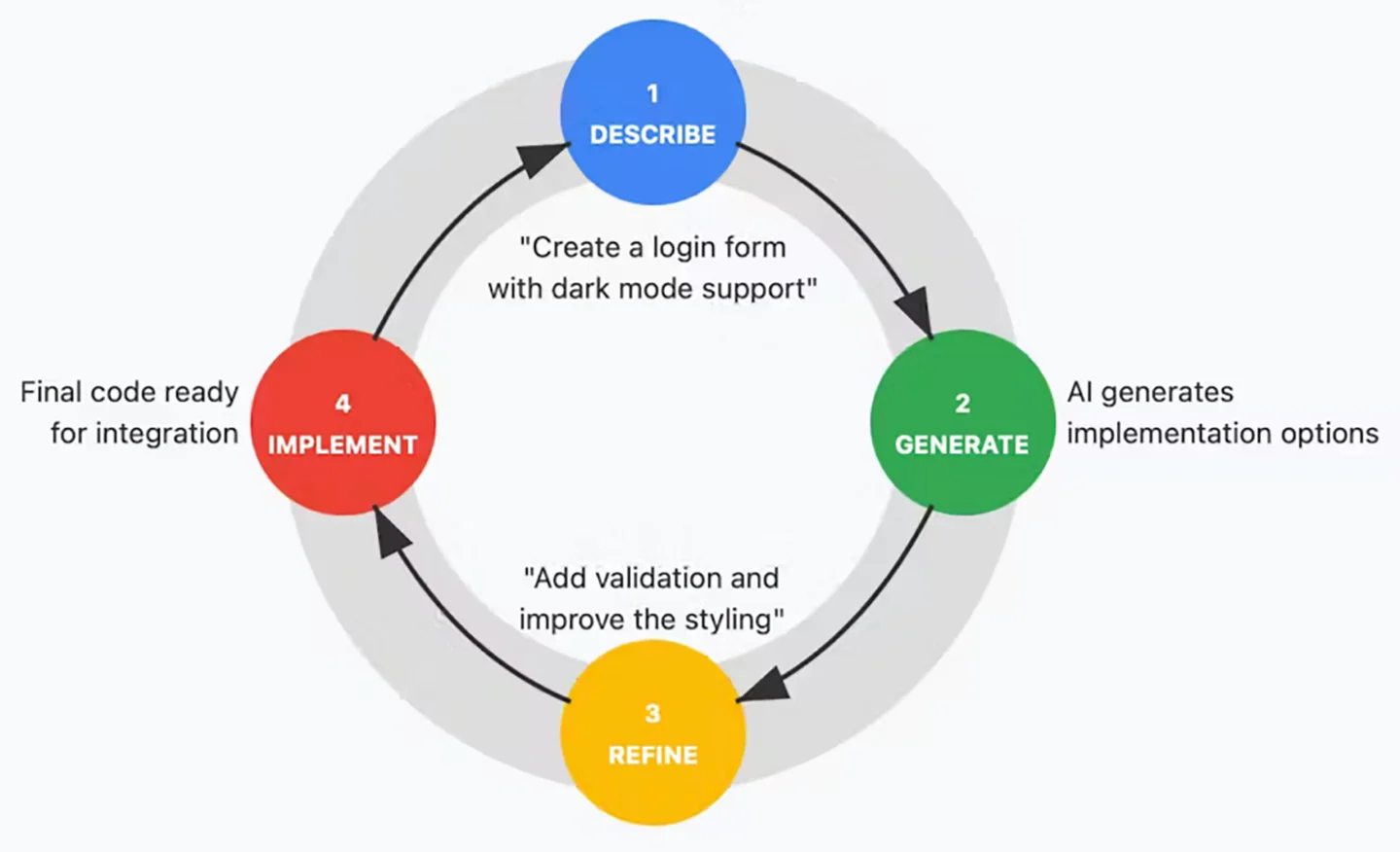
Consider the rhythm of a typical development day. You spend a significant chunk of time on work that's necessary but not particularly creative: scaffolding components, writing unit tests, debugging CSS inconsistencies, wiring up API endpoints, writing documentation that nobody wants to write but everyone needs to read. This is exactly where AI tooling shines. Hand Claude a component spec and it'll generate a solid first pass in seconds. Point Copilot at a function and it'll suggest test cases you hadn't considered. Use Cursor to refactor a messy module and you'll get clean, consistent code that follows the patterns already established in your codebase.
The key word in all of this is "first pass".
The teams getting real value from AI aren't treating it as a magic button that outputs finished code. They're using it to compress the gap between zero and something, so they can spend their actual expertise on the gap between something and great. You still need experienced developers reviewing the output, making architectural decisions, and applying the kind of contextual judgment that no model can replicate. But when your developer isn't burning two hours on boilerplate before they can even start solving the real problem, the quality of their focused work goes up dramatically.
Where this gets particularly powerful is in the prototyping and iteration phases. We talked in a previous post about the value of building prototypes in the same tools you ship with. AI tooling makes that approach even more viable because the cost of exploration drops significantly. Want to test three different approaches to a complex interaction? You can scaffold all three in the time it used to take to build one. Want to quickly evaluate whether a particular state management pattern will hold up at scale? Rough it out, stress test it, and make an informed decision instead of committing based on gut instinct.
The workflow we've settled into at DBT looks something like this. AI handles the generation of boilerplate, initial component scaffolding, test case creation, and documentation drafts. Our developers handle architecture decisions, code review, performance optimization, accessibility auditing, and the nuanced UX work that requires understanding the actual humans who will use the product. The AI accelerates the mechanical work. The humans ensure the output is actually good.
There are pitfalls, of course. The most common one we see is over reliance, teams accepting AI generated code without proper review because it "looks right." AI models are confident, fluent, and occasionally wrong in ways that are hard to spot at a glance. They'll generate code that works perfectly in isolation but introduces subtle bugs when integrated into a larger system. They'll suggest patterns that are technically valid but architecturally questionable for your specific context. The review step isn't optional. It's the whole point.
The other pitfall is under utilization. Some teams resist AI tooling out of pride, skepticism, or a vague sense that using it is somehow cheating. This is like refusing to use a power drill because you learned on a hand drill. The end product is what matters, and if a tool helps you build it faster and better, professional pride should push you toward using it, not away from it.
The teams that are pulling ahead right now aren't the ones with the biggest budgets or the most developers. They're the ones who've figured out how to integrate AI into their workflow in a way that amplifies human judgment instead of replacing it. That's the unlock. Not AI instead of developers. AI in service of developers, clearing the path so the people on your team can do the work only they can do.
Ready to supercharge your efforts?
- Cursor: The AI Code Editor — The IDE that's built from the ground up around AI assisted development. Worth trying if you haven't already.
- GitHub Copilot Documentation — Comprehensive docs on integrating Copilot into your existing workflow and getting the most out of it.
- Anthropic: Claude for Development — Claude's API documentation for teams looking to integrate AI directly into their development pipelines and tooling.
- Vercel v0 — Vercel's AI powered UI generation tool. Particularly useful for rapid prototyping of React components.
- Thoughtworks Technology Radar — Updated quarterly with assessments of emerging tools and techniques, including AI development tooling.